Deployment
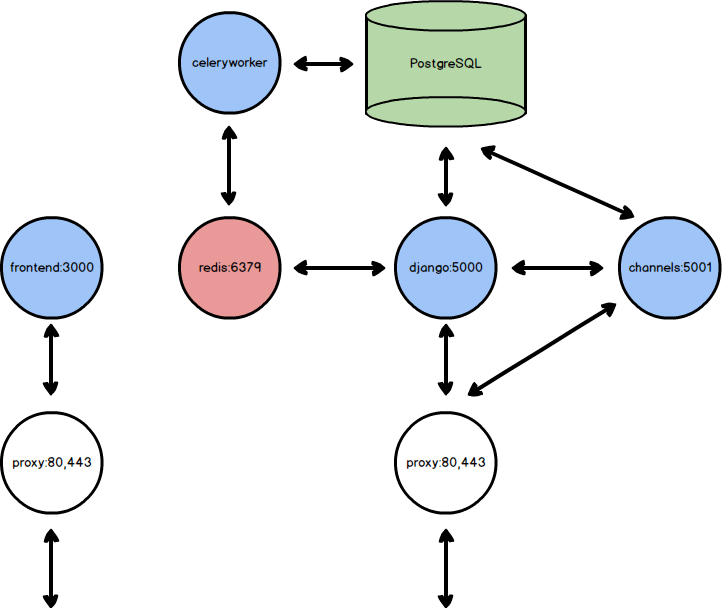
According to the current configuration for production, in order to deploy the Control Tower platform, we have to have access to the following resources:
A server or cloud platform able to run Docker containers.
An external service to store statics, compatible with Amazon S3.
A service for sending transactional emails (like Mailgun, Sendgrid…).
A HTTP proxy, like nginx.
Optional but recommended:
An external PostgreSQL database.
An external Redis server.
Note
The PostgreSQL and Redis server can be created using Docker containers, but is recommended to use external services.
Docker Repositories
Assuming we have the registry server credentials in the $REGISTRY_PASSWORD and $REGISTRY_USER
environment variables, the first thing we have to do is login in the registry server.
echo $REGISTRY_PASSWORD | docker login registry.dekaside.com -u $REGISTRY_USER --password-stdin
Once is this performed, we can pull all the docker images.
Backend services
The Control Tower backend is composed by the following services:
Sync HTTP server, using gunicorn over Django, for handle the RESTful API requests.
Async HTTP server, using daphne over Django-Channels, for handle WebSockets and realtime notifications.
A worker for running background tasks, like sending emails, using Celery.
The system can be configured using several approaches, but in the end, all these services can be executed using the same Docker image, only changing the command to run.
Example
First, we can pull the backend docker image:
docker pull registry.dekaside.com/controltower/controltower-backend:latest
To run the sync HTTP server, assuming all the environment variables are in the
.env file:
docker run --rm --env-file .env -p 5000:5000 controltower-backend ./start
To run the async HTTP server, assuming all the environment variables are in the
.env file:
docker run --rm --env-file .env -p 5001:5001 controltower-backend ./start-channels
To run the worker, assuming all the environment variables are in the
.env file:
docker run --rm --env-file .env controltower-backend ./start-celeryworker
Note
Other service can be executed using the same Docker image, named celerybeat. This
service is used as scheduled task launcher, but for Control Tower it isn’t needed.
Frontend services
The Control Tower frontend is composed by the following service:
Frontend server (with Nuxt), for rendering the frontend application.
Example
First, we can pull the backend docker image:
docker pull registry.dekaside.com/controltower/controltower-frontend:latest
Then, we can execute the Nuxt server, setting the environment variables in the command:
docker run --rm -e NODE_ENV=production -e NUXT_HOST=0.0.0.0 -p 3000:3000 controltower-frontend ./start